Wazuh - VirusTotal Active Response Integration (Windows)
Objective
Configure Wazuh Active Response to automatically remediate malicious files detected by the VirusTotal integration on Windows endpoints. Building on our previous VirusTotal integration guide, this tutorial covers mapping custom command definitions, binding active-response triggers to VirusTotal alert rule IDs, and verifying automated quarantine/removal on target agents.
Skills Learned
- Custom Active Response Development: Writing Python scripts that ingest and process Wazuh JSON payloads from
stdin. - Executable Compilation: Packaging Python scripts into dependency-free
.exebinaries with PyInstaller for Windows agent compatibility. - Active Response Architecture: Mapping custom
<command>and<active-response>definitions inossec.conf. - Targeted Threat Remediation: Scoping automated deletion specifically to VirusTotal rule detections (Rule
87105) to prevent false-positive file loss.
Prerequisites
- Completed Wazuh - VirusTotal Integration (Windows).
- Wazuh Manager running version 4.x or higher.
- Windows Endpoint running the Wazuh Agent with Python 3.x and PyInstaller installed (for script compilation).
Steps
Step 1: Create the Custom Python Remediation Script
When Wazuh triggers an active response executable on Windows, it passes a JSON string containing event details directly to the executable via standard input (stdin).
- Open PowerShell on a target Windows agent host as Administrator.
-
Create a working directory (e.g. mkdir WazuhBuild):
1
New-Item -ItemType Directory -Path "C:\WazuhBuild"
-
Navigate to the directory and create a new file (e.g. remove-threat.py) where we will draft the Python remediation script into a readable Windows executable file.
1
2
cd C:\WazuhBuild
notepad remove-threat.py
-
We will now paste the following Python script, that was provided by Wazuh themselves
1
2
3
4
5
6
7
8
9
10
11
12
13
14
15
16
17
18
19
20
21
22
23
24
25
26
27
28
29
30
31
32
33
34
35
36
37
38
39
40
41
42
43
44
45
46
47
48
49
50
51
52
53
54
55
56
57
58
59
60
61
62
63
64
65
66
67
68
69
70
71
72
73
74
75
76
77
78
79
80
81
82
83
84
85
86
87
88
89
90
91
92
93
94
95
96
97
98
99
100
101
102
103
104
105
106
107
108
109
110
111
112
113
114
115
116
117
118
119
120
121
122
123
124
125
126
127
128
129
130
131
132
133
134
135
136
137
138
139
140
141
142
143
144
145
146
147
148
149
150
151
152
     # Copyright (C) 2015-2025, Wazuh Inc.
 # All rights reserved.

 import os
 import sys
 import json
 import datetime
 import stat
 import tempfile
 import pathlib

 if os.name == 'nt':
     LOG_FILE = "C:\\Program Files (x86)\\ossec-agent\\active-response\\active-responses.log"
 else:
     LOG_FILE = "/var/ossec/logs/active-responses.log"

 ADD_COMMAND = 0
 DELETE_COMMAND = 1
 CONTINUE_COMMAND = 2
 ABORT_COMMAND = 3

 OS_SUCCESS = 0
 OS_INVALID = -1

 class message:
     def __init__(self):
         self.alert = ""
         self.command = 0

 def write_debug_file(ar_name, msg):
     with open(LOG_FILE, mode="a") as log_file:
         log_file.write(str(datetime.datetime.now().strftime('%Y/%m/%d %H:%M:%S')) + " " + ar_name + ": " + msg +"\n")

 def setup_and_check_message(argv):
     input_str = ""
     for line in sys.stdin:
         input_str = line
         break

     msg_obj = message()
     try:
         data = json.loads(input_str)
     except ValueError:
         write_debug_file(argv[0], 'Decoding JSON has failed, invalid input format')
         msg_obj.command = OS_INVALID
         return msg_obj

     msg_obj.alert = data
     command = data.get("command")

     if command == "add":
         msg_obj.command = ADD_COMMAND
     elif command == "delete":
         msg_obj.command = DELETE_COMMAND
     else:
         msg_obj.command = OS_INVALID
         write_debug_file(argv[0], 'Not valid command: ' + command)

     return msg_obj

 def send_keys_and_check_message(argv, keys):
     keys_msg = json.dumps({"version": 1,"origin":{"name": argv[0],"module":"active-response"},"command":"check_keys","parameters":{"keys":keys}})
     write_debug_file(argv[0], keys_msg)

     print(keys_msg)
     sys.stdout.flush()

     input_str = ""
     while True:
         line = sys.stdin.readline()
         if line:
             input_str = line
             break

     try:
         data = json.loads(input_str)
     except ValueError:
         write_debug_file(argv[0], 'Decoding JSON has failed, invalid input format')
         return OS_INVALID

     action = data.get("command")
     if action == "continue":
         return CONTINUE_COMMAND
     elif action == "abort":
         return ABORT_COMMAND
     else:
         write_debug_file(argv[0], "Invalid value of 'command'")
         return OS_INVALID

 def secure_delete_file(filepath_str, ar_name):
     filepath = pathlib.Path(filepath_str)

     # Reject NTFS alternate data streams
     if '::' in filepath_str:
         raise Exception(f"Refusing to delete ADS or NTFS stream: {filepath_str}")

     # Reject symbolic links and reparse points
     if os.path.islink(filepath):
         raise Exception(f"Refusing to delete symbolic link: {filepath}")

     attrs = os.lstat(filepath).st_file_attributes
     if attrs & stat.FILE_ATTRIBUTE_REPARSE_POINT:
         raise Exception(f"Refusing to delete reparse point: {filepath}")

     resolved_filepath = filepath.resolve()

     # Ensure it's a regular file
     if not resolved_filepath.is_file():
         raise Exception(f"Target is not a regular file: {resolved_filepath}")

 # Perform deletion
     os.remove(resolved_filepath)

 def main(argv):
     write_debug_file(argv[0], "Started")
     msg = setup_and_check_message(argv)

     if msg.command < 0:
         sys.exit(OS_INVALID)

     if msg.command == ADD_COMMAND:
         alert = msg.alert["parameters"]["alert"]
         keys = [alert["rule"]["id"]]
         action = send_keys_and_check_message(argv, keys)

         if action != CONTINUE_COMMAND:
             if action == ABORT_COMMAND:
                 write_debug_file(argv[0], "Aborted")
                 sys.exit(OS_SUCCESS)
             else:
                 write_debug_file(argv[0], "Invalid command")
                 sys.exit(OS_INVALID)

         try:
             file_path = alert["data"]["virustotal"]["source"]["file"]
             if os.path.exists(file_path):
                 secure_delete_file(file_path, argv[0])
                 write_debug_file(argv[0], json.dumps(msg.alert) + " Successfully removed threat")
             else:
                 write_debug_file(argv[0], f"File does not exist: {file_path}")
         except OSError as error:
             write_debug_file(argv[0], json.dumps(msg.alert) + "Error removing threat")
         except Exception as e:
             write_debug_file(argv[0], f"{json.dumps(msg.alert)}: Error removing threat: {str(e)}")
     else:
         write_debug_file(argv[0], "Invalid command")

     write_debug_file(argv[0], "Ended")
     sys.exit(OS_SUCCESS)

 if __name__ == "__main__":
     main(sys.argv)
Step 2: Compile Python Script to Windows Executable (remove-threat.exe)
Because Wazuh agent execution policies expect standalone executables or batch files in Windows environments, compile remove-threat.py into a single standalone .exe using PyInstaller.
-
Install PyInstaller via pip:
1
 pip install pyinstaller
-
Compile remove-threat.py into a single binary (Windows readable executable file):
1
 pyinstaller --onefile --console remove-threat.py
-
Copy the generated executable to the official Wazuh Active Response directory:
1
 Copy-Item ".\dist\remove-threat.exe" -Destination "C:\Program Files (x86)\ossec-agent\active-response\bin\" -Force
-
Verify the executable exists in C:\Program Files (x86)\ossec-agent\active-response\bin\remove-threat.exe.
Note: If
remove-threat.exeis not located in thebindirectory, Wazuh Active Response will fail to execute.
Step 3: Configure VirusTotal Active Response on Wazuh Manager
Return to the Wazuh Manager to configure the command definition and trigger rule that invokes remove-threat.exe whenever VirusTotal flags a malicious file:
- Log in to your Wazuh Manager terminal as
root. -
Edit the main configuration file
/var/ossec/etc/ossec.conf:1
sudo nano /var/ossec/etc/ossec.conf -
Add the command Block:
1
2
3
4
5
 <command>
     <name>remove-threat</name>
     <executable>remove-threat.exe</executable>
     <timeout_allowed>no</timeout_allowed>
 </command>
-
Add the active-response Trigger Block:
1
2
3
4
5
6
 <active-response>
     <disabled>no</disabled>
     <command>remove-threat</command>
     <location>local</location>
     <rules_id>87105</rules_id>
 </active-response>
Configuration Breakdown:
<command>: References the remove-threat command definition.<location>local</location>: Runs the executable on the agent that detected the file.<rules_id>87105</rules_id>: Restricts execution strictly to VirusTotal malicious detections.
Step 4: Configure Custom Rules for VirusTotal Alerts
While Wazuh provides standard built-in rules for VirusTotal detections (/var/ossec/ruleset/rules/0615-virustotal_rules.xml), custom rules are required in /var/ossec/etc/rules/local_rules.xml to parse the execution results (success or failure) of your active response scripts.
-
Open the Local Rules Configuration File: Log in to your Wazuh Manager terminal and open local_rules.xml:
1
sudo nano /var/ossec/etc/rules/local_rules.xml -
Add Custom Detection & Active Response Rules: Insert the following XML block inside the
tags (or under a dedicated virustotal group block): 1 2 3 4 5 6 7 8 9 10 11 12 13
<group name="virustotal,"> <rule id="100092" level="12"> <if_sid>657</if_sid> <match>Successfully removed threat</match> <description>$(parameters.program) removed threat located at $(parameters.alert.data.virustotal.source.file)</description> </rule> <rule id="100093" level="12"> <if_sid>657</if_sid> <match>Error removing threat</match> <description>Error removing threat located at $(parameters.alert.data.virustotal.source.file)</description> </rule> </group>
-
Restart Wazuh Manager: Restart the Wazuh Manager service to load the new rules:
1
 sudo systemctl restart wazuh-manager
Step 5: Verification & Testing
Warning Use the EICAR test file for validation. Do not use live malware samples.
- Trigger the Alert:
- Save the official EICAR test string into your monitored agent directory
(e.g., C:\Users\User\Downloads\eicar.com.txt).
- Save the official EICAR test string into your monitored agent directory
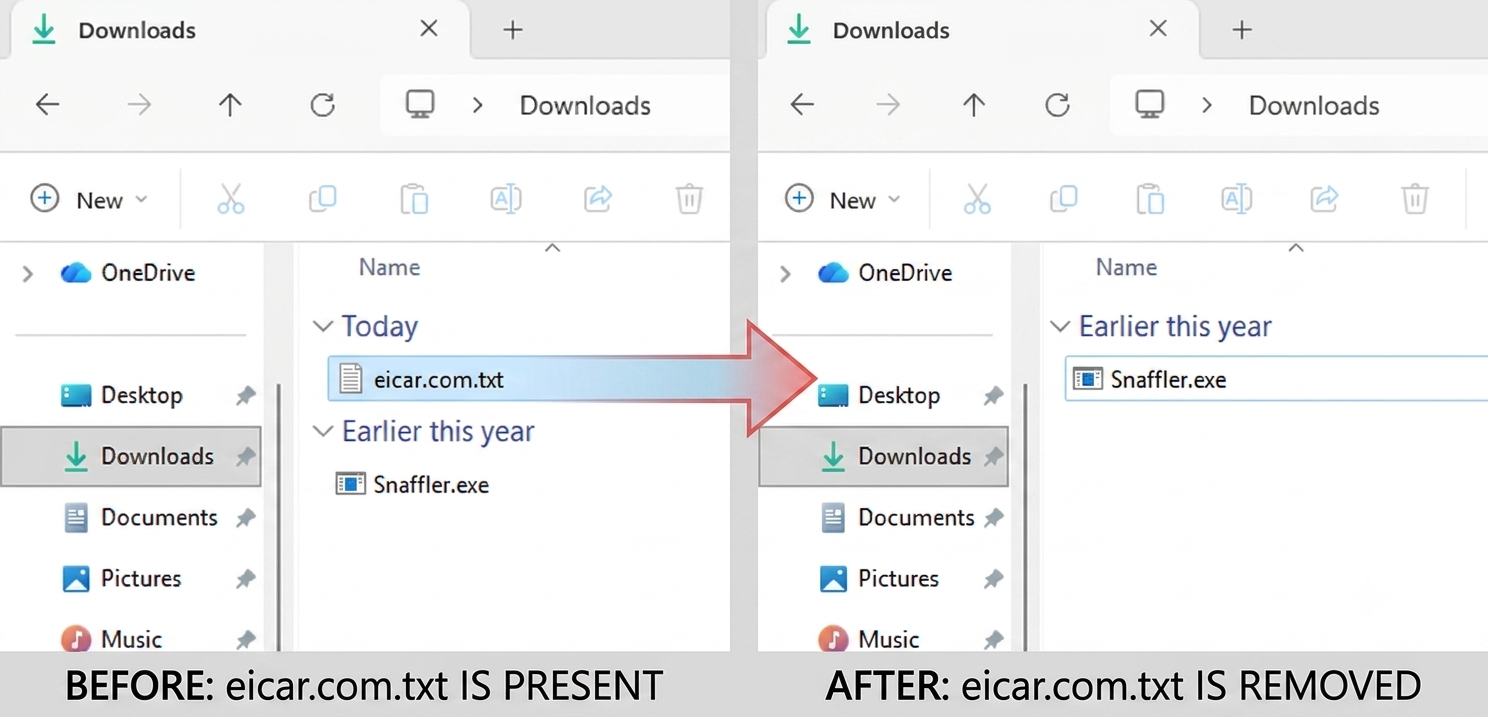
- Verify File Removal:
- Within seconds, eicar.com.txt should disappear from the Downloads directory.
- Inspect Active Response Logs:
- Run PowerShell as Administrator on the agent. You should see the
remove-threat.exeexecute and succesfully remove the threat
1
 Get-Content "C:\Program Files (x86)\ossec-agent\active-response\active-responses.log" -Tail 10
- Run PowerShell as Administrator on the agent. You should see the
- Verify Dashboard Event:
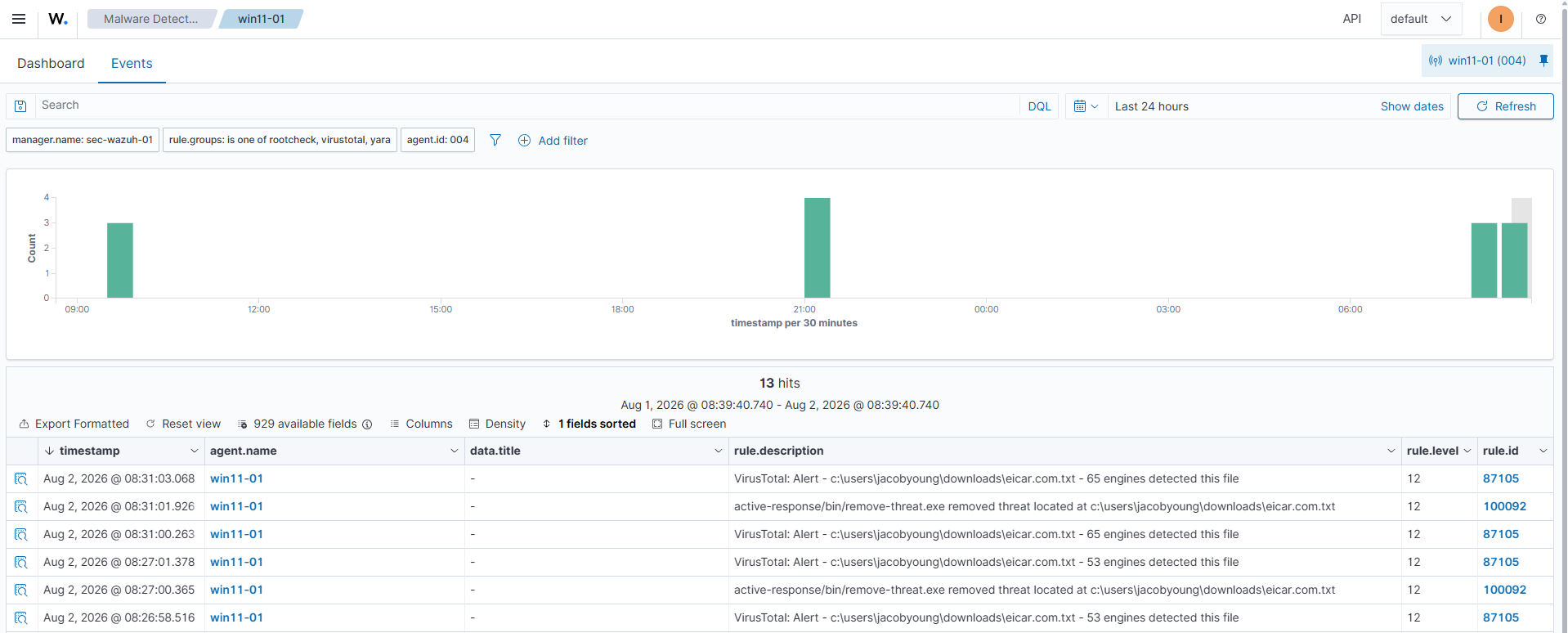
- Open Wazuh Dashboard > Malware Detection and query for Rule ID 87105 or 100092 to confirm active response alert generation.
87105: VirusTotal: Alert - virustotal.source.file - virustotal.positives engines detected this file100092: parameters.program removed threat located at parameters.alert.data.virustotal.source.file
- Open Wazuh Dashboard > Malware Detection and query for Rule ID 87105 or 100092 to confirm active response alert generation.
Notes
- Handling File Locks: If a malicious file is open or locked by another process (or caught first by Windows Defender),
remove-threat.exemay throw a permissions or file access error. Always checkactive-responses.logon the endpoint if a file is not removed. - API Quota Management: Active Response execution relies on VirusTotal lookups occurring in real time. Ensure your VirusTotal API limits (e.g., 4 requests/min on public free tiers) are monitored, as rate-limiting will prevent Rule
87105from firing.